Supported sources — Postgres, MySQL, Snowflake, BigQuery, Iceberg, Delta, CSV, Parquet
Every file and database source DataCharter can query and join locally — how each is registered, and how pushdown behaves.
DataCharter federates every source through one DuckDB engine. Each source type is registered by one of four mechanisms, and pushdown (sending filters and projections to where the data lives) behaves accordingly.
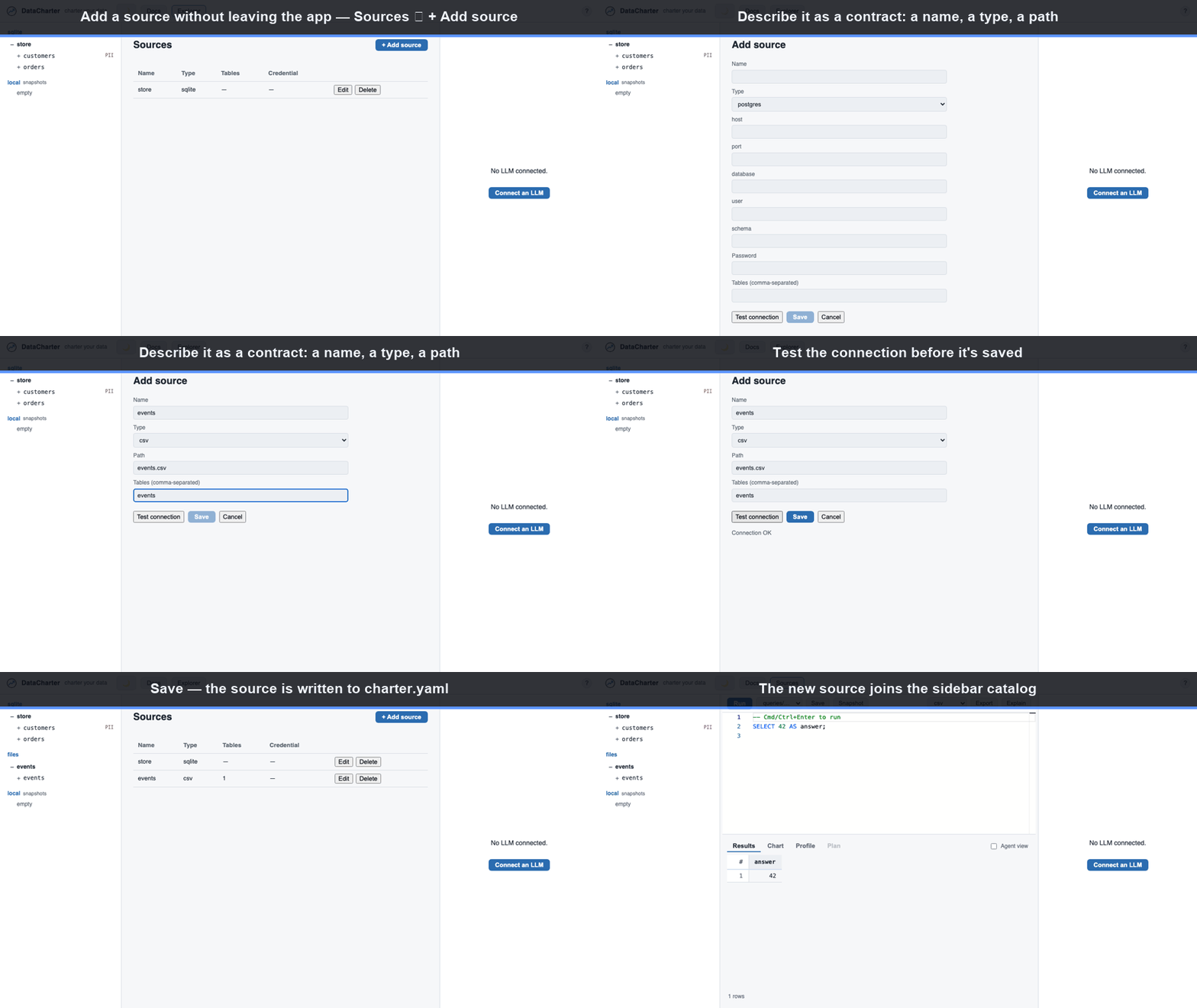
Add a source in the UI
You don’t have to hand-edit charter.yaml: open Sources ▸ + Add source,
give it a name, type, and path (or connection), test the connection, and save.
DataCharter writes the source into charter.yaml and registers it live.
Registration mechanisms
- ATTACH — DuckDB attaches the source as a catalog using a built-in or auto-installed extension. Credentials are injected as a temporary secret and the catalog is attached read-only.
- ATTACH (community extension) — the same, but the extension is fetched
from the DuckDB community repository on first use
(
INSTALL <ext> FROM community; LOAD <ext>). - file-view — a view over a DuckDB file reader
(
read_csv,read_parquet,read_json,read_xlsx,iceberg_scan,delta_scan). Remote paths (s3://, and other object stores) loadhttpfsand use a temporary S3-style secret from the source’s credentials. - connector-extract — no reliable ATTACH exists, so a Python connector pulls rows into a local DuckDB table. The result is queried exactly like an attached source, but it is materialized rather than live-federated.
The matrix
| Type | Mechanism | Extension / dependency | Pushdown |
|---|---|---|---|
postgres |
ATTACH | postgres (bundled) |
Native DuckDB filter + projection |
mysql |
ATTACH | mysql (bundled) |
Native DuckDB filter + projection |
sqlite |
ATTACH | sqlite (bundled) |
Native DuckDB filter + projection |
duckdb |
ATTACH | core | Native DuckDB filter + projection (attach an existing .duckdb/.db file, read-only) |
bigquery |
ATTACH (community extension) | bigquery (auto-installed) |
Native DuckDB filter + projection |
mssql |
ATTACH (community extension) | mssql (auto-installed) |
Native DuckDB filter + projection |
csv |
file-view | core (httpfs for remote) |
Column projection; row pruning where the reader supports it |
parquet |
file-view | core (httpfs for remote) |
Column projection + row-group / predicate pruning |
json |
file-view | core (httpfs for remote) |
Column projection |
excel |
file-view | excel core extension (auto-loaded) |
Reads .xlsx; column projection |
iceberg |
file-view | iceberg core extension |
Column projection + partition pruning |
delta |
file-view | delta core extension |
Column projection + partition pruning |
snowflake |
connector-extract | datacharter[snowflake] extra |
Connector pushdown planner + aggregation pushdown; materialized, capped by max_rows |
motherduck |
ATTACH (md:) |
motherduck (signed, auto-installed) |
Native DuckDB filter + projection over your MotherDuck cloud database, read-only |
iceberg_rest |
ATTACH (REST catalog) | iceberg core extension |
Native DuckDB filter + projection over an Iceberg REST catalog (Polaris / Nessie / Lakekeeper / Unity / Glue / S3 Tables), read-only |
ducklake |
ATTACH (DuckLake catalog) | ducklake core extension |
Native DuckDB filter + projection over a DuckLake lakehouse (metadata in DuckDB/SQLite/Postgres/MySQL, data as Parquet on local/object storage), read-only |
Pushdown, honestly
ATTACH and file sources get their pushdown from DuckDB’s own optimizer, for free. A single-source filter or projection is pushed into the remote scan or the file reader. This holds even inside a cross-source join: each leg is reduced by its own pushdown first, then DuckDB performs the join locally. There is no engine but DuckDB that sees both legs, so a cross-source join itself cannot be pushed down, but every leg still filters at its source.
The connector-extract path (Snowflake) has no DuckDB scanner to push into, so DataCharter computes the pushdown itself, deterministically, from the query’s syntax tree (no model involved):
- Projection: only the columns the query references for that table are pulled. Any ambiguity falls back to all columns.
- Predicates: top-level
ANDconjuncts that reference exactly one connector table with a safe, constant-operand shape (=,<>,<,>,<=,>=,IN,IS [NOT] NULL,LIKE) are pushed into the extract SQL. Anything else stays local. - Aggregation pushdown: a single-table pure aggregation
(
count/sum/avg/min/maxwith bareGROUP BYkeys, a pushableWHERE,ORDER BYon outputs, andLIMIT) is reconstructed and run whole on Snowflake, so only the small grouped result crosses the wire instead of a large extract.
Pushdown is always a pure optimization: the full WHERE re-runs locally in
DuckDB against the materialized rows, so a conservative push (a subset of
predicates, a superset of columns) is always correct. A missed optimization
never changes an answer.
The Snowflake extract cap
Because Snowflake is materialized rather than streamed, the extract is bounded by
a row cap: max_rows in charter.yaml, defaulting to 1,000,000. The connector
probes one row past the cap, so if the source held more, the result is flagged
as truncated: an amber banner in the UI and a warning in the agent’s tool
payload. The cap never fails silently. To pull the complete result set anyway,
raise max_rows, narrow your query so pushdown pulls less, or use Export
(COPY ... TO), which writes the full result and bypasses the display cap.
Uniform table names
Every table declared in a source’s tables: list is exposed as a flat view
named "<source>__<table>", collapsing six different qualification schemes
into one predictable name; dotted source.table names always work, listed or
not. A Snowflake connector table reads identically to an attached one at the
query layer. File sources are already a single flat relation named after the
source (for example, orders), so they need no alias.
-- A cross-source join reads the same regardless of where each side lives:
SELECT c.email, sum(o.total) AS spend
FROM warehouse__customers c
JOIN orders o ON o.customer_id = c.id
GROUP BY c.email
ORDER BY spend DESC;
Declaring one is a few lines of charter.yaml — for example:
sources:
  warehouse:
    type: postgres
    connection: { host: db.internal, database: analytics, user: readonly }
    credentials:
      password: ${WAREHOUSE_PASSWORD}
    tables: [customers, orders]

  events:
    type: parquet
    path: s3://lake/events/*.parquet
    credentials:
      key_id: ${AWS_KEY_ID}
      secret: ${AWS_SECRET}
Every field, per type, is in the charter.yaml reference.
Iceberg REST catalogs, and where the data lives
An iceberg_rest source attaches a whole catalog — Polaris, Nessie, Lakekeeper,
Unity, AWS Glue, or S3 Tables — and exposes its tables as
<source>.<namespace>.<table>. Two kinds of credential are in play, and they are
not the same thing:
- Catalog auth — how DataCharter talks to the REST catalog. A bearer
token, an OAuth2client_id/client_secret, or (for Glue / S3 Tables) AWSkey_id/secret/region. This is what yourcredentialsblock sets. A dev/local catalog with no auth needsconnection.authorization_type: none. - Storage access — how the query engine reads the underlying data files. Most managed catalogs (Polaris, Unity, Lakekeeper, Glue) vend short-lived storage credentials, so nothing more is needed. For a catalog that does not vend, DataCharter reads the files with the standard cloud credentials from your environment (the S3/GCS/Azure credential chain); a custom object store (MinIO or another non-AWS endpoint) additionally needs that endpoint configured for DuckDB. This split is inherent to Iceberg REST, not specific to DataCharter.
Governance is unchanged either way: the catalog is attached READ_ONLY, and PII
you declare on its tables is masked on the agent surface exactly as for any other
source.
DuckLake lakehouses
A ducklake source attaches a DuckLake catalog and
exposes its tables as <source>.<schema>.<table> (schema defaults to main).
DuckLake keeps table metadata in a SQL database and the data as Parquet files, so a
source has two parts:
connection.metadata(required) — the catalog. Either a file path (a local*.ducklake/ DuckDB file, resolved against the workspace) or a SQL-backed DSN with a scheme:postgres:…,sqlite:…, ormysql:…. The backing DuckDB extension is loaded automatically. Put catalog-DB credentials in the DSN as${ENV}references — connection strings are interpolated.connection.data_path(optional) — where the Parquet data lives. DuckLake stores this in the catalog, so you only need it to point at a new location or an object store. Fors3:///gcs:///az://data, thecredentialsblock (key_id/secret/region/endpoint) becomes a DuckDB secret — it never goes into the ATTACH string.
sources:
  lake:
    type: ducklake
    connection:
      metadata: "postgres:dbname=catalog host=${PG_HOST} user=${PG_USER} password=${PG_PASSWORD}"
      data_path: s3://my-bucket/lake
    credentials:
      key_id: ${AWS_ACCESS_KEY_ID}
      secret: ${AWS_SECRET_ACCESS_KEY}
      region: us-east-1
    tables: [customers, orders]
    pii:
      customers: [email]
The catalog is attached READ_ONLY, and declared PII is masked on the agent
surface exactly as for any other source.
Next: Connect an agent →