Open source · Apache-2.0 · runs entirely on your machine

Your data, explored locally. Your agents, on a leash.

One SQL workspace over every file and database you have, federated by DuckDB and governed by a contract. An AI agent sees exactly what the charter grants it, and not one column more.

$uvx datacharter serve Star on GitHub

No cloud, no telemetry, no API key required: the chat agent can run on your Claude Code subscription or a fully local model.

crm.customers ⨝ sales.orders · governed result
SELECT name, email, region, amount FROM crm.customers JOIN sales.orders USING (customer_id)
nameemailPIIregionamount
Ada Morenoada@volt.dev•••EU1,204.50
Grace Okaforgrace@arc.io•••US986.00
Kat Jensenkat@lumen.co•••US2,410.75
Lin Chenlin@delta.sh•••APAC1,877.25
your view · unrestricted flip it ↑

§1 · Federate

One query over everything you have

A local CSV, a Postgres table, and a Parquet file on S3: joined in one SQL statement, on your laptop. Filters and projections are pushed down to each source, so every leg of a cross-source join is filtered where its data lives.

query.sql · three sources, one join
SELECT c.region, sum(o.amount) AS revenue
FROM 'leads.csv' l            -- local file
JOIN crm.customers c         -- Postgres
  ON c.email = l.email
JOIN sales.orders o          -- Parquet on S3
  ON o.customer_id = c.id
GROUP BY 1 ORDER BY 2 DESC;
  • No pipelines, no warehouse, no waiting. The engine is embedded DuckDB, one process on your machine.
  • Drag a file onto the window and it's queryable instantly. Or declare sources in charter.yaml.
  • Read-only by construction. No query can write, delete, or touch the filesystem, so pointing anything at your production replica can't do damage.
CSVParquetJSONExcelSQLiteDuckDBPostgresMySQLSQL ServerBigQuerySnowflakeIcebergDelta

§2 · Govern

The contract is the catalog — and the law

charter.yaml is the same ODCS-style contract your data team already writes: sources, tables, PII. DataCharter is what makes it enforceable, for humans and agents alike.

charter.yaml · the part that governs
sources:
  crm:
    type: postgres
    tables:
      customers:
        pii: [email, phone]   # masked for agents by default

agent_access:
  crm:
    customers:
      email: deny            # not one column more

row_filters:
  orders: "region = 'US'"    # the rows an agent may see
  • PII is auto-detected and denied by default

    Declared and detected PII comes back masked (•••) unless you grant it, per source, table, or column.

  • Row-level security on every agent query

    Predicates from the charter are applied to any query an agent runs: fail-closed, composed with masking.

  • Predicates can't leak what masking hides

    A masked column can't be used in WHERE, JOIN, or ORDER BY to reconstruct values. The guard reads the whole query tree.

  • Proof, not promises

    Flip Agent view on any result and see, column by column, exactly what the model receives.

§3 · Serve agents

Four read-only tools. Any MCP client.

The built-in chat agent and the MCP server share one governed surface. Chat in the UI, or wire your workspace into Claude Code, Claude Desktop, Cursor, Cline, or Gemini CLI. Listed in the official MCP Registry.

list_sources

The data sources the charter declares, with their types.

read-only
list_tables

Every queryable table, with fully-qualified relation names.

read-only
describe_table

Columns and types for one relation, masked columns flagged.

read-only
query

Read-only SQL, PII-masked, row-filtered, cost-guarded.

read-only
$datacharter mcp /path/to/workspace …or one-click via the Claude Desktop extension. Every answer shows the exact SQL it ran.

The workspace

A workspace, not a dashboard

Everything you reach for daily, in one local window. And every agent answer is reproducible: the SQL it ran, one click from the editor.

  • Monaco SQL editor with catalog autocomplete
  • Live results preview as you type
  • ⌘K command palette
  • Auto-charts (Vega-Lite) & profiling with top-value bars
  • Query history & cross-source lineage
  • Cost pre-flight: row estimates before you run
  • Schema & PII drift checks for CI
  • Data tests: datacharter test
  • Snapshots & CSV/Parquet/JSON/XLSX export
  • Certified metrics with joins & time grains
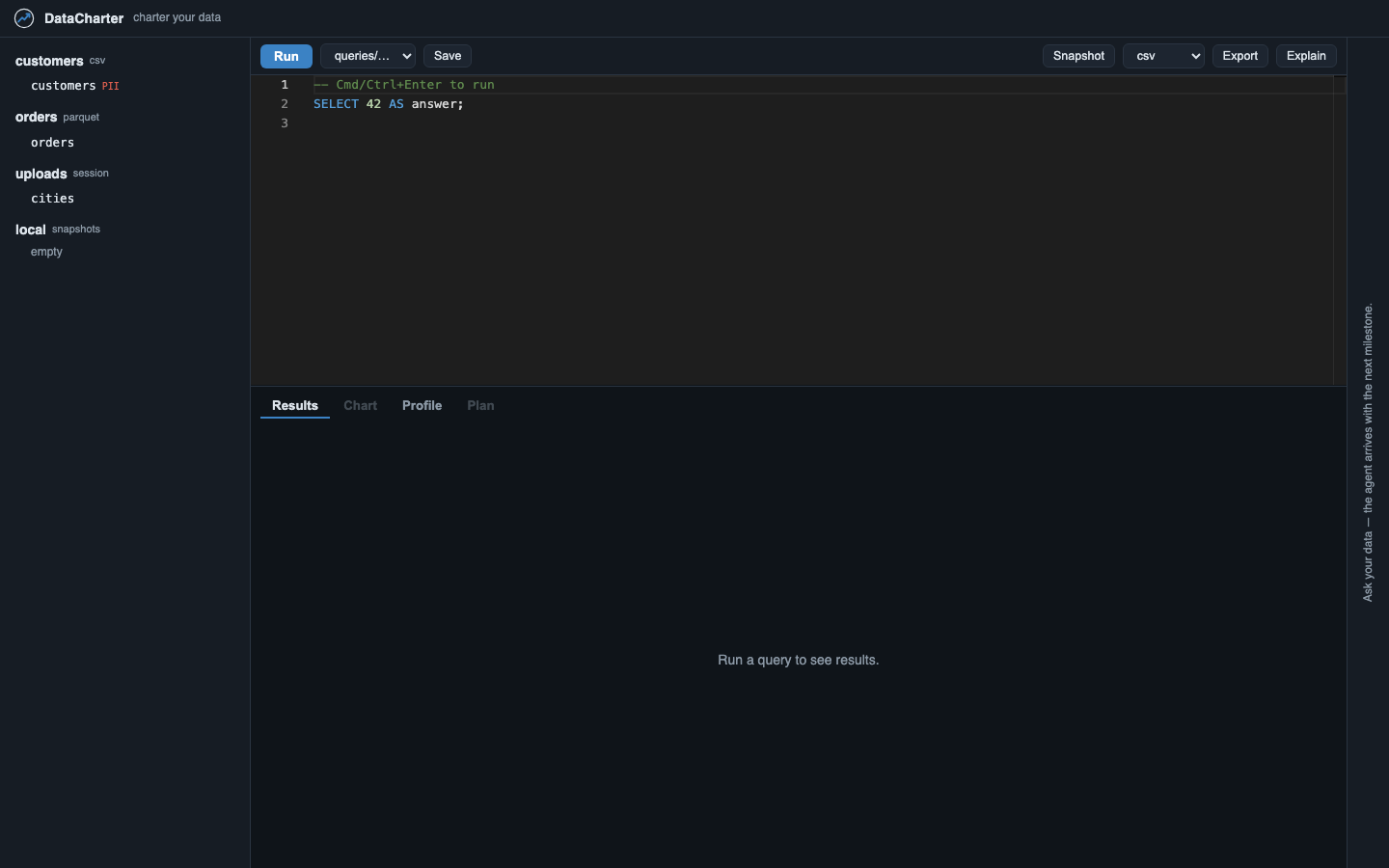
The DataCharter workspace: source tree, SQL editor, and Results, Chart, Profile, and Plan tabs

Get started

Charter your data

One package, one process, works offline. Python 3.11+.

Try it · no installuvx datacharter serve
macOS · Homebrewbrew install datacharter/tap/datacharter
Everywhere · pippip install datacharter

Then datacharter init scaffolds charter.yaml + queries/. Commit it, clone it, serve it. The whole environment travels as a repo; secrets never do. Read the quick start →

The vision

Why DataCharter exists

Rishi Mashelkar

“A Data Engineer wears many Hats!”

Hi, I am Rishi and I am a DataHolic… ugh, I mean a Data Engineer. I built DataCharter after hitting a wall I suspect you've met too: I wanted to point an AI agent at real data, and every way of doing it felt indefensible. Handing an agent your sensitive PII is a governance incident with extra steps. Pasting CSVs into a chat window is… not a data platform.

Meanwhile, every data contract I'd ever written (sources, tables, PII fields) just sat in a repo describing data instead of protecting it. DataCharter is the tool I wanted to exist: everything queryable locally in one grid, and the contract promoted from documentation to law, so an agent can be genuinely useful without ever seeing more than it should.

It's open source because governance you can't inspect isn't governance. If DataCharter is useful to you, a GitHub star helps more than you'd think, and an issue or PR helps even more.

Rishi Mashelkar
data engineer · GitHub · LinkedIn · hello@datacharter.dev

Built on

DuckDB is a trademark of the DuckDB Foundation. DataCharter is an independent project and is not affiliated with or endorsed by the DuckDB Foundation.