<?xml version="1.0" encoding="utf-8"?><feed xmlns="http://www.w3.org/2005/Atom" ><generator uri="https://jekyllrb.com/" version="3.10.0">Jekyll</generator><link href="https://datacharter.dev/feed.xml" rel="self" type="application/atom+xml" /><link href="https://datacharter.dev/" rel="alternate" type="text/html" /><updated>2026-08-04T16:23:25+00:00</updated><id>https://datacharter.dev/feed.xml</id><title type="html">DataCharter</title><subtitle>Contract-governed local data exploration, powered by DuckDB.</subtitle><entry><title type="html">The guide that writes itself</title><link href="https://datacharter.dev/blog/the-guide-that-writes-itself/" rel="alternate" type="text/html" title="The guide that writes itself" /><published>2026-08-03T00:00:00+00:00</published><updated>2026-08-03T00:00:00+00:00</updated><id>https://datacharter.dev/blog/the-guide-that-writes-itself</id><content type="html" xml:base="https://datacharter.dev/blog/the-guide-that-writes-itself/"><![CDATA[<p>A few releases ago I added <a href="agent-context-belongs-in-the-contract.html">guides</a> —
plain-language context that makes agents dramatically better at answering
questions over your data. The feedback was consistent: <em>love it… but who’s going
to sit down and write them?</em></p>

<p>Fair. Nobody documents tribal knowledge. That’s what makes it tribal.</p>

<p>But here’s the thing I realized while staring at the query history panel: <strong>you
already wrote it.</strong> Every time you typed <code class="language-plaintext highlighter-rouge">WHERE refunded = false</code>, you wrote a
guide line. You just wrote it in SQL, forty times, instead of English, once.</p>

<h2 id="mining-the-habits">Mining the habits</h2>

<p>DataCharter 0.16.0 adds:</p>

<div class="language-sh highlighter-rouge"><div class="highlight"><pre class="highlight"><code><span class="nv">$ </span>datacharter suggest
Guide suggestions mined from your query <span class="nb">history</span>:

  1. <span class="o">[</span>filter] Queries on <span class="sb">`</span>sales<span class="sb">`</span> usually filter <span class="sb">`</span>refunded <span class="o">=</span> <span class="nb">false</span><span class="sb">`</span>
     <span class="o">(</span>14 of 20 recent queries<span class="o">)</span> — treat it as the default filter.
  2. <span class="o">[</span>filter] Queries on <span class="sb">`</span>crm.customers<span class="sb">`</span> usually filter <span class="sb">`</span>tier <span class="o">!=</span> <span class="s1">'internal'</span><span class="sb">`</span>
     <span class="o">(</span>9 of 12 recent queries<span class="o">)</span> — treat it as the default filter.
  3. <span class="o">[</span><span class="nb">join</span><span class="o">]</span> <span class="sb">`</span>sales<span class="sb">`</span> and <span class="sb">`</span>crm.customers<span class="sb">`</span> are usually queried together —
     they <span class="nb">join </span>naturally.
</code></pre></div></div>

<p><code class="language-plaintext highlighter-rouge">--apply</code> writes them into <code class="language-plaintext highlighter-rouge">guides/suggested.md</code> — a normal guide file you can
edit — and from that moment every agent (chat, Claude Desktop, Cursor, Claude
Code over MCP) inherits your habits. The Guides editor in the browser shows the
same suggestions with an <strong>Add</strong> button.</p>

<h2 id="the-part-im-smug-about">The part I’m smug about</h2>

<p>There’s no model in this loop. DuckDB — the same engine that runs your queries —
also <em>parses</em> them: its <code class="language-plaintext highlighter-rouge">json_serialize_sql</code> function returns a full AST, so
DataCharter walks your WHERE clauses structurally instead of regexing at them.
Deterministic, offline, testable, and the evidence is right there in the
suggestion (“14 of 20 recent queries”). It also dedupes against what your guides
already say, so it never nags about knowledge you’ve already written down.</p>

<p>And because <a href="measure-your-context-lift.html">evals</a> exist, you don’t have to
take the suggestion’s word for it: accept a suggested guide, run
<code class="language-plaintext highlighter-rouge">datacharter eval --compare-guides</code>, and <em>measure</em> whether your own habits made
the agent more accurate. (They will. You filtered those refunds for a reason.)</p>

<h2 id="the-loop-closed">The loop, closed</h2>

<p>This completes a loop I’ve been circling for two weeks: the contract governs
what an agent may touch, guides make it smart, evals prove the guides work, the
flight recorder proves what happened, canaries alarm if protection ever fails —
and now the guides bootstrap themselves from the way you already work.</p>

<p>Tribal knowledge, extracted from the tribe’s actual behavior. With receipts.</p>

<div class="language-sh highlighter-rouge"><div class="highlight"><pre class="highlight"><code>uvx datacharter suggest    <span class="c"># or: brew install datacharter/tap/datacharter</span>
</code></pre></div></div>

<p>Code and docs: <a href="https://github.com/datacharter/datacharter">github.com/datacharter/datacharter</a> ·
<a href="https://datacharter.dev">datacharter.dev</a></p>]]></content><author><name>Rishi Mashelkar</name></author><summary type="html"><![CDATA[You already wrote the tribal knowledge — one WHERE clause at a time. DataCharter now mines your query history for the habits you repeat and turns them into agent guides, with evidence, fully offline.]]></summary><media:thumbnail xmlns:media="http://search.yahoo.com/mrss/" url="https://datacharter.dev/assets/hero.png" /><media:content medium="image" url="https://datacharter.dev/assets/hero.png" xmlns:media="http://search.yahoo.com/mrss/" /></entry><entry><title type="html">DataCharter on your desktop</title><link href="https://datacharter.dev/blog/datacharter-on-your-desktop/" rel="alternate" type="text/html" title="DataCharter on your desktop" /><published>2026-08-02T00:00:00+00:00</published><updated>2026-08-02T00:00:00+00:00</updated><id>https://datacharter.dev/blog/datacharter-on-your-desktop</id><content type="html" xml:base="https://datacharter.dev/blog/datacharter-on-your-desktop/"><![CDATA[<p>Confession: I love the terminal. <code class="language-plaintext highlighter-rouge">uvx datacharter serve</code> feels like home. But
every time I showed DataCharter to an analyst friend, the demo died at the same
spot — not at contracts, not at masking, at <em>“first, open a terminal.”</em></p>

<p>So: DataCharter is now a desktop app.</p>

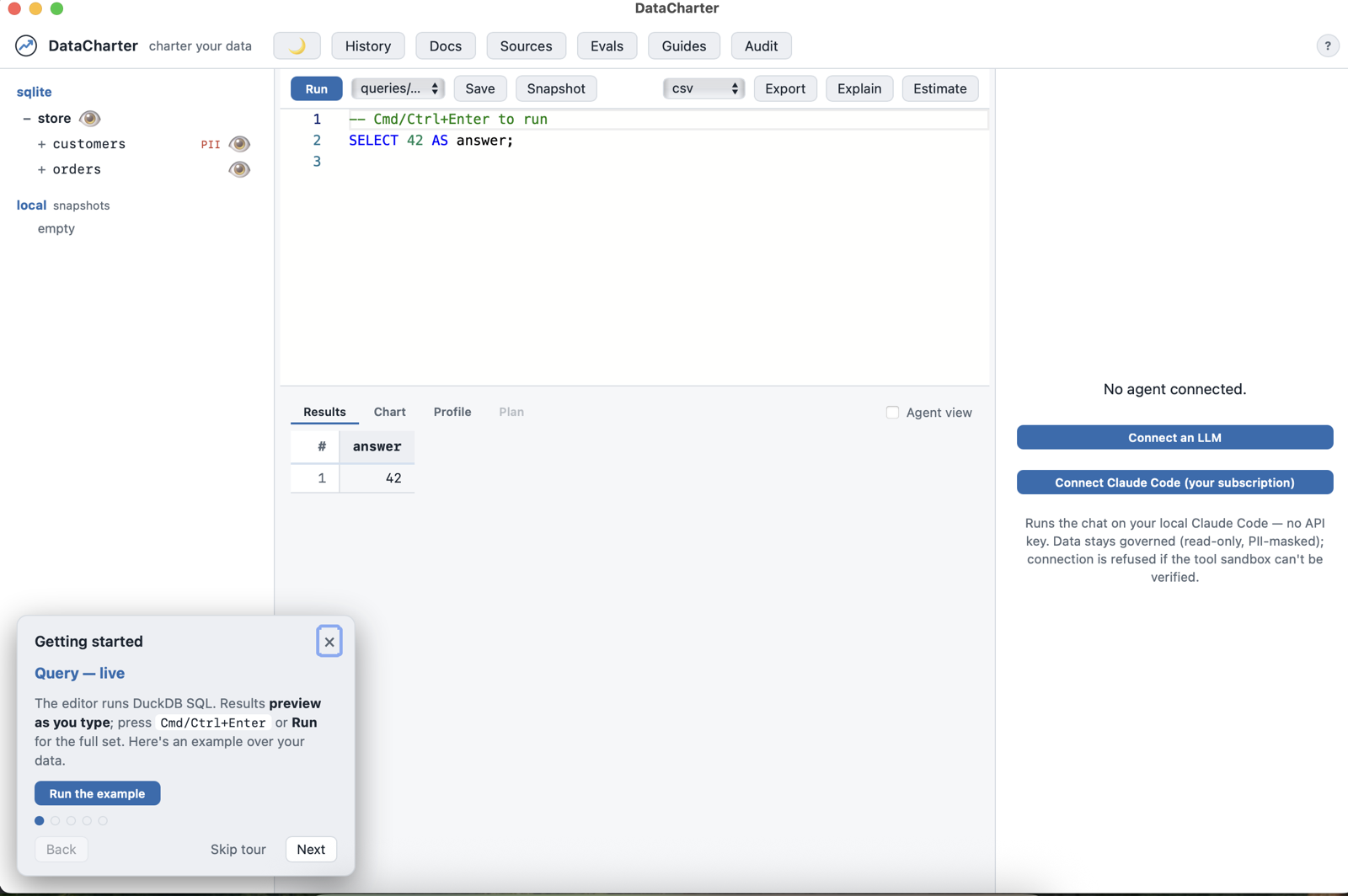
<p><img src="/assets/desktop-app.png" alt="The DataCharter desktop app" /></p>

<p>Double-click, pick a workspace folder (or start with the demo), and you’re in —
the explorer, guides, evals, the audit timeline, the governed agent surface, all
of it. The app remembers your last workspace and keeps a <strong>Workspace ▸ Recents</strong>
menu, like the document-based apps you already know.</p>

<h2 id="same-engine-zero-compromise">Same engine, zero compromise</h2>

<p>There is no “desktop edition.” The app is the exact DataCharter you install from
PyPI — the local FastAPI server and web UI — wrapped in your operating system’s
own webview (WKWebView on macOS, WebView2 on Windows). It binds to localhost
only. Every governance layer applies identically: PII masking, row filters, the
read-only guard, the flight recorder, canary tripwires. Your data still never
leaves your machine; it just stopped requiring a terminal to prove it.</p>

<p>Under the hood it’s Python frozen with PyInstaller and a pywebview window —
about 90 MB, cold-starts in a couple of seconds, and each platform’s build runs
a headless smoke check in CI before it’s allowed near a release.</p>

<h2 id="the-honest-part-its-a-beta">The honest part: it’s a beta</h2>

<p>Downloads live on the <a href="https://github.com/datacharter/datacharter/releases/latest">latest release</a>
— macOS <code class="language-plaintext highlighter-rouge">.dmg</code> (Apple Silicon + Intel) and a Windows <code class="language-plaintext highlighter-rouge">.exe</code>.</p>

<p>Two things to know:</p>

<ul>
  <li><strong>The builds are unsigned for now.</strong> On macOS Sequoia that means a one-time
trip to System Settings → Privacy &amp; Security → “Open Anyway” (Apple removed
the right-click shortcut). Windows SmartScreen wants “More info → Run anyway.”
The <a href="https://datacharter.dev/desktop.html">desktop docs</a> walk through both.
Signing is on the roadmap; it’s a certificate, not a rewrite.</li>
  <li><strong>Windows is CI-verified, not yet human-soaked.</strong> The smoke checks pass on
every build, but I develop on a Mac — if you run Windows, you’re the beta
program, and I’d genuinely love your bug reports.</li>
</ul>

<p>The terminal paths — <code class="language-plaintext highlighter-rouge">brew install datacharter/tap/datacharter</code>, <code class="language-plaintext highlighter-rouge">uvx
datacharter</code> — remain the first-class citizens. The app is for the days (and
the colleagues) that don’t want one.</p>

<div class="language-text highlighter-rouge"><div class="highlight"><pre class="highlight"><code>Download → open → pick a folder → your data, governed.
</code></pre></div></div>

<p>Code and docs: <a href="https://github.com/datacharter/datacharter">github.com/datacharter/datacharter</a> ·
<a href="https://datacharter.dev/desktop.html">Desktop app docs</a> · <a href="https://datacharter.dev">datacharter.dev</a></p>]]></content><author><name>Rishi Mashelkar</name></author><summary type="html"><![CDATA[The governed data explorer is now a double-clickable app — macOS and Windows, beta, no terminal required. Same local server, same masking, same audit chain, now with a dock icon.]]></summary><media:thumbnail xmlns:media="http://search.yahoo.com/mrss/" url="https://datacharter.dev/assets/hero.png" /><media:content medium="image" url="https://datacharter.dev/assets/hero.png" xmlns:media="http://search.yahoo.com/mrss/" /></entry><entry><title type="html">The black-box flight recorder for AI data access</title><link href="https://datacharter.dev/blog/the-black-box-flight-recorder-for-ai-data-access/" rel="alternate" type="text/html" title="The black-box flight recorder for AI data access" /><published>2026-08-01T00:00:00+00:00</published><updated>2026-08-01T00:00:00+00:00</updated><id>https://datacharter.dev/blog/the-black-box-flight-recorder-for-ai-data-access</id><content type="html" xml:base="https://datacharter.dev/blog/the-black-box-flight-recorder-for-ai-data-access/"><![CDATA[<p>Here’s the pattern that stopped me cold this week: ask a team running AI agents
“what did your agent touch last Tuesday?” and watch the room go quiet. Surveys
of enterprise MCP adoption keep finding the same blocker near the top —
<strong>the missing audit trail</strong>. There’s no standard record of which tools an agent
called, with what arguments, and what came back; every incident review starts
from screenshots and vibes.</p>

<p>Airplanes solved this problem decades ago. You don’t argue about what happened
on a flight — you pull the black box.</p>

<p>So DataCharter 0.14.0 ships one.</p>

<h2 id="every-access-on-the-record">Every access, on the record</h2>

<p>DataCharter already sits at a convenient chokepoint: every agent query — the
built-in chat, Claude Desktop, Cursor, Cline over MCP, Claude Code — flows
through the same four governed tools. As of 0.14.0, each call is recorded:</p>

<div class="language-json highlighter-rouge"><div class="highlight"><pre class="highlight"><code><span class="p">{</span><span class="nl">"seq"</span><span class="p">:</span><span class="w"> </span><span class="mi">2</span><span class="p">,</span><span class="w"> </span><span class="nl">"ts"</span><span class="p">:</span><span class="w"> </span><span class="s2">"2026-08-01T12:00:05Z"</span><span class="p">,</span><span class="w"> </span><span class="nl">"type"</span><span class="p">:</span><span class="w"> </span><span class="s2">"access"</span><span class="p">,</span><span class="w"> </span><span class="nl">"session"</span><span class="p">:</span><span class="w"> </span><span class="s2">"a1b2"</span><span class="p">,</span><span class="w">
 </span><span class="nl">"tool"</span><span class="p">:</span><span class="w"> </span><span class="s2">"query"</span><span class="p">,</span><span class="w"> </span><span class="nl">"sql"</span><span class="p">:</span><span class="w"> </span><span class="s2">"SELECT email FROM crm.customers"</span><span class="p">,</span><span class="w">
 </span><span class="nl">"masked_columns"</span><span class="p">:</span><span class="w"> </span><span class="p">[</span><span class="s2">"email"</span><span class="p">],</span><span class="w"> </span><span class="nl">"row_count"</span><span class="p">:</span><span class="w"> </span><span class="mi">50</span><span class="p">,</span><span class="w">
 </span><span class="nl">"result_sha256"</span><span class="p">:</span><span class="w"> </span><span class="s2">"9f2c…"</span><span class="p">,</span><span class="w"> </span><span class="nl">"prev"</span><span class="p">:</span><span class="w"> </span><span class="s2">"3e81…"</span><span class="p">,</span><span class="w"> </span><span class="nl">"hash"</span><span class="p">:</span><span class="w"> </span><span class="s2">"c04a…"</span><span class="p">}</span><span class="w">
</span></code></pre></div></div>

<p>Notice what’s there — and what isn’t. The SQL, the columns that came back
masked, a fingerprint of the exact result the agent saw. <strong>No raw rows.</strong> An
audit log that copies your data is just a second thing to leak; this one stores
metadata and hashes.</p>

<p>Sessions get <strong>dual attribution</strong>, which is the thing compliance folks actually
ask for: the OS user <em>and</em> the AI system identity. When an MCP client connects,
it introduces itself — Claude Desktop, Cursor, whoever — and that identity goes
in the record. Who accessed what, when, through which system. Answered.</p>

<h2 id="the-part-i-like-most-it-argues-back">The part I like most: it argues back</h2>

<p>Each entry carries the previous entry’s hash, and its own hash covers its
content. Edit one line of history — one character of one SQL string — and:</p>

<div class="language-sh highlighter-rouge"><div class="highlight"><pre class="highlight"><code><span class="nv">$ </span>datacharter audit verify
chain BROKEN at <span class="nb">seq </span>214: entry content does not match its <span class="nb">hash</span>
</code></pre></div></div>

<p>Delete a line? The chain breaks. Reorder? Breaks. The log doesn’t ask you to
trust it; it invites you to check.</p>

<p>And when someone upstream asks “what have the agents been doing in there?”, one
command produces an evidence pack — the entries, a verification statement, the
contract that was in force, and a summary — as a zip you can hand over:</p>

<div class="language-sh highlighter-rouge"><div class="highlight"><pre class="highlight"><code>datacharter audit <span class="nb">export</span> <span class="nt">--since</span> 2026-07-01
</code></pre></div></div>

<h2 id="on-by-default-off-by-choice">On by default, off by choice</h2>

<p>A black box you have to remember to switch on isn’t a black box. Recording is
on by default, failure-safe (an audit write can never break a query), local
like everything else, and <code class="language-plaintext highlighter-rouge">audit: off</code> in the charter turns it off if you truly
want that. <code class="language-plaintext highlighter-rouge">datacharter serve</code> grew an <strong>Audit</strong> panel — a session timeline
under a live “chain verified ✓” badge.</p>

<p>It joins what’s become a pattern I’m fond of: the contract <em>grants</em> access,
guides make the agent <em>smart</em> about it, evals <em>measure</em> it, and now the flight
recorder <em>proves</em> what happened. Governance with receipts.</p>

<div class="language-sh highlighter-rouge"><div class="highlight"><pre class="highlight"><code>uvx datacharter serve   <span class="c"># or: brew install datacharter/tap/datacharter</span>
</code></pre></div></div>

<p>Try it, ask your agent something, then run <code class="language-plaintext highlighter-rouge">datacharter audit</code> — and if you can
break the chain without <code class="language-plaintext highlighter-rouge">verify</code> noticing, I very much want to hear from you.</p>

<p>Code and docs: <a href="https://github.com/datacharter/datacharter">github.com/datacharter/datacharter</a> ·
<a href="https://datacharter.dev/audit.html">Audit docs</a> · <a href="https://datacharter.dev">datacharter.dev</a></p>]]></content><author><name>Rishi Mashelkar</name></author><summary type="html"><![CDATA[Most teams running AI agents can't answer 'what did it touch?'. DataCharter 0.14.0 ships the missing piece: a tamper-evident audit trail of every agent query — dual-attributed, hash-chained, exportable as evidence.]]></summary><media:thumbnail xmlns:media="http://search.yahoo.com/mrss/" url="https://datacharter.dev/assets/hero.png" /><media:content medium="image" url="https://datacharter.dev/assets/hero.png" xmlns:media="http://search.yahoo.com/mrss/" /></entry><entry><title type="html">Tripwires for AI data leaks</title><link href="https://datacharter.dev/blog/tripwires-for-ai-data-leaks/" rel="alternate" type="text/html" title="Tripwires for AI data leaks" /><published>2026-08-01T00:00:00+00:00</published><updated>2026-08-01T00:00:00+00:00</updated><id>https://datacharter.dev/blog/tripwires-for-ai-data-leaks</id><content type="html" xml:base="https://datacharter.dev/blog/tripwires-for-ai-data-leaks/"><![CDATA[<p>Security teams have a trick they’ve loved for decades: the honeytoken. Plant a
fake credential, a fake database row, a fake AWS key — something no legitimate
process would ever touch — and wire it to an alarm. The beauty is the signal
quality: there are no false positives, because <em>any</em> interaction with the bait
is, by definition, wrong.</p>

<p>Yesterday I shipped a <a href="the-black-box-flight-recorder-for-ai-data-access.html">flight recorder</a>
that proves what your AI agents did. Today’s release answers a nastier
question: <strong>how would you know the moment your protections stop working?</strong></p>

<h2 id="canaries-but-masked">Canaries, but masked</h2>

<p>DataCharter 0.15.0 adds canary tripwires with one line in your contract:</p>

<div class="language-yaml highlighter-rouge"><div class="highlight"><pre class="highlight"><code><span class="na">canary</span><span class="pi">:</span> <span class="s">on</span>
</code></pre></div></div>

<p>That plants <code class="language-plaintext highlighter-rouge">local.canaries</code> — a small table of synthetic PII whose values embed
unique tokens like <code class="language-plaintext highlighter-rouge">canary-8f3a2c1d@tripwire.invalid</code>. Here’s the twist that
makes it interesting: the table is <strong>masked by the exact same machinery that
protects your real data</strong>. An agent that queries it sees <code class="language-plaintext highlighter-rouge">•••</code>, the same as your
customers’ emails.</p>

<p>Follow that to its conclusion. The canaries are synthetic, so they exist nowhere
else. They’re masked, so a working governance layer never lets them out. Which
means a canary token appearing in agent output isn’t <em>suspicious</em> — it’s
<strong>proof</strong>: masking or the query guard failed, right there, on that query. The
classic honeytoken property, aimed at a new target. Not “did someone touch the
bait” but “did the safety net tear.”</p>

<h2 id="when-the-wire-trips">When the wire trips</h2>

<p>The alarm lands as an entry in the flight recorder’s hash chain — so the
evidence of the failure is itself tamper-evident — and lights up a red banner in
the Audit panel. And you choose the response posture:</p>

<div class="language-yaml highlighter-rouge"><div class="highlight"><pre class="highlight"><code><span class="na">canary</span><span class="pi">:</span> <span class="s">on</span>              <span class="c1"># block: withhold any response carrying a canary</span>
<span class="na">canary</span><span class="pi">:</span> <span class="pi">{</span> <span class="nv">mode</span><span class="pi">:</span> <span class="nv">log</span> <span class="pi">}</span>   <span class="c1"># log: let it through, alarm loudly</span>
</code></pre></div></div>

<p>Block mode is my favorite part. Since there is no legitimate reason for a canary
to surface, withholding the response costs nothing — the tripwire doesn’t just
report the leak, it stops it.</p>

<p>Trust, but verify — including the tripwire itself:</p>

<div class="language-sh highlighter-rouge"><div class="highlight"><pre class="highlight"><code><span class="nv">$ </span>datacharter canary drill
Drill OK: token detected and alarm recorded <span class="k">in </span>the audit chain.
</code></pre></div></div>

<p>The drill pushes a synthetic hit through the real detection-and-alarm path, so
you’re never wondering whether the wire is actually connected.</p>

<h2 id="the-shape-this-is-all-taking">The shape this is all taking</h2>

<p>Each piece of DataCharter now covers a different tense: the contract governs
what an agent <em>may</em> do, guides make it <em>smart</em> about your data, evals <em>measure</em>
how well that works, the flight recorder proves what <em>did</em> happen — and
canaries alarm the instant the whole apparatus <em>fails</em>. Defense in depth, on
your laptop, in a YAML file.</p>

<div class="language-sh highlighter-rouge"><div class="highlight"><pre class="highlight"><code>uvx datacharter serve   <span class="c"># or: brew install datacharter/tap/datacharter</span>
</code></pre></div></div>

<p>It’s opt-in — add <code class="language-plaintext highlighter-rouge">canary: on</code> to a workspace and run the drill. And if you can
get a canary out <em>without</em> tripping the alarm, that’s a bug report I’ll drop
everything for.</p>

<p>Code and docs: <a href="https://github.com/datacharter/datacharter">github.com/datacharter/datacharter</a> ·
<a href="https://datacharter.dev/audit.html">Audit &amp; canaries</a> · <a href="https://datacharter.dev">datacharter.dev</a></p>]]></content><author><name>Rishi Mashelkar</name></author><summary type="html"><![CDATA[Security folks have loved honeytokens for decades: any touch is by definition suspicious. DataCharter 0.15.0 plants them for AI agents — masked canaries that can only surface if your protection layer actually failed.]]></summary><media:thumbnail xmlns:media="http://search.yahoo.com/mrss/" url="https://datacharter.dev/assets/hero.png" /><media:content medium="image" url="https://datacharter.dev/assets/hero.png" xmlns:media="http://search.yahoo.com/mrss/" /></entry><entry><title type="html">Agent context belongs in the contract</title><link href="https://datacharter.dev/blog/agent-context-belongs-in-the-contract/" rel="alternate" type="text/html" title="Agent context belongs in the contract" /><published>2026-07-29T00:00:00+00:00</published><updated>2026-07-29T00:00:00+00:00</updated><id>https://datacharter.dev/blog/agent-context-belongs-in-the-contract</id><content type="html" xml:base="https://datacharter.dev/blog/agent-context-belongs-in-the-contract/"><![CDATA[<p><a href="https://motherduck.com/blog/">MotherDuck launched Guides</a> this week: markdown
context for analytics agents, stored in the warehouse. In their benchmarking on
419 DABStep questions, guides improved agent accuracy by 72 percentage points
and cut cost per run by 55%.</p>

<p>Those numbers deserve attention, because they confirm something that anyone who
has watched an agent write SQL already suspects: <strong>the model’s biggest handicap
isn’t SQL skill, it’s missing tribal knowledge.</strong> The schema says <code class="language-plaintext highlighter-rouge">amount</code> is a
<code class="language-plaintext highlighter-rouge">DECIMAL</code>. It does not say that revenue means net of refunds, that QA accounts
have <code class="language-plaintext highlighter-rouge">tier = 'internal'</code>, or that <code class="language-plaintext highlighter-rouge">created_at</code> is a system timestamp nobody
should group by. A colleague would tell you all of that in two minutes. The
agent gets none of it.</p>

<p>MotherDuck’s answer is to store that knowledge in the warehouse. It’s a good
answer for warehouse-native teams. But it made me want to argue for a slightly
different home.</p>

<h2 id="context-is-a-contract-concern">Context is a contract concern</h2>

<p>DataCharter is built on one idea: the data contract you already write — sources,
tables, PII — should be <em>enforced</em>, not just documented. Masking, row-level
security, and read-only access all flow from <code class="language-plaintext highlighter-rouge">charter.yaml</code>.</p>

<p>Tribal knowledge belongs in the same place, because it has the same properties:</p>

<ul>
  <li><strong>It should be versioned.</strong> “Revenue means net of refunds” is a definition
someone decided. Definitions change; you want the diff and the blame.</li>
  <li><strong>It should be reviewed.</strong> A guide edit changes what every agent will believe
about your data. That is exactly what pull requests are for.</li>
  <li><strong>It should travel.</strong> A workspace you can <code class="language-plaintext highlighter-rouge">git clone &amp;&amp; datacharter serve</code>
should arrive knowing its own quirks, on any machine, with no cloud attached.</li>
</ul>

<p>So as of <strong>DataCharter 0.11.0</strong> (out today), context lives with the contract:</p>

<div class="language-plaintext highlighter-rouge"><div class="highlight"><pre class="highlight"><code>my-workspace/
  charter.yaml
  guides/
    analytics.md      # "net revenue excludes refunded orders…"
  data/
</code></pre></div></div>

<p>Free-form markdown in <code class="language-plaintext highlighter-rouge">guides/*.md</code>, plus per-table notes in the charter
itself:</p>

<div class="language-yaml highlighter-rouge"><div class="highlight"><pre class="highlight"><code><span class="na">sources</span><span class="pi">:</span>
  <span class="na">crm</span><span class="pi">:</span>
    <span class="na">type</span><span class="pi">:</span> <span class="s">postgres</span>
    <span class="na">tables</span><span class="pi">:</span> <span class="pi">[</span><span class="nv">customers</span><span class="pi">]</span>
    <span class="na">context</span><span class="pi">:</span>
      <span class="na">customers</span><span class="pi">:</span> <span class="s2">"</span><span class="s">One</span><span class="nv"> </span><span class="s">row</span><span class="nv"> </span><span class="s">per</span><span class="nv"> </span><span class="s">customer;</span><span class="nv"> </span><span class="s">tier</span><span class="nv"> </span><span class="s">=</span><span class="nv"> </span><span class="s">'internal'</span><span class="nv"> </span><span class="s">marks</span><span class="nv"> </span><span class="s">QA</span><span class="nv"> </span><span class="s">accounts</span><span class="nv"> </span><span class="s">—</span><span class="nv"> </span><span class="s">exclude</span><span class="nv"> </span><span class="s">them."</span>
</code></pre></div></div>

<h2 id="served-through-the-governed-surface">Served through the governed surface</h2>

<p>The interesting part is the delivery. DataCharter exposes exactly four
read-only, PII-masked tools to agents, and guides ride the surfaces that
already exist:</p>

<ul>
  <li>The <strong>built-in chat agent</strong> gets guides in its system prompt.</li>
  <li><strong>Claude Code</strong> gets them appended to its system prompt by the driver.</li>
  <li><strong>Every MCP client</strong> — Claude Desktop, Cursor, Cline, Gemini CLI — receives
them through the Model Context Protocol’s <code class="language-plaintext highlighter-rouge">initialize</code> <code class="language-plaintext highlighter-rouge">instructions</code> field,
which clients inject into model context automatically.</li>
  <li><code class="language-plaintext highlighter-rouge">describe_table</code> returns a table’s declared context right next to its schema
and masked columns.</li>
</ul>

<p>No new tools, no separate context store, no sync job. And because guides pass
through the same surface that masks PII and enforces row filters, the agent
that knows your revenue definition still can’t see one column more than the
contract grants.</p>

<h2 id="try-it-in-two-minutes">Try it in two minutes</h2>

<p>The repo ships an <a href="https://github.com/datacharter/datacharter/tree/main/examples/ecommerce">end-to-end example workspace</a>
with all of it wired together: PII masking, agent access, row filters, guides,
data tests, and a metric. Point any MCP client at it and ask “what’s revenue by
region?” — the guide steers the model to net revenue and away from the QA
accounts, and the masking makes sure the identities never leave your machine.</p>

<div class="language-sh highlighter-rouge"><div class="highlight"><pre class="highlight"><code>uvx datacharter serve examples/ecommerce   <span class="c"># or: brew install datacharter/tap/datacharter</span>
</code></pre></div></div>

<p>Context makes agents accurate. Contracts make them safe. They belong in the
same file tree.</p>

<p>Code and docs: <a href="https://github.com/datacharter/datacharter">github.com/datacharter/datacharter</a> ·
<a href="https://datacharter.dev">datacharter.dev</a></p>]]></content><author><name>Rishi Mashelkar</name></author><summary type="html"><![CDATA[MotherDuck just showed that prose context is the biggest lever for agent SQL accuracy. Here's the local, contract-governed take: guides that live in your repo and ship through the governed surface — in DataCharter 0.11.0, out today.]]></summary><media:thumbnail xmlns:media="http://search.yahoo.com/mrss/" url="https://datacharter.dev/assets/hero.png" /><media:content medium="image" url="https://datacharter.dev/assets/hero.png" xmlns:media="http://search.yahoo.com/mrss/" /></entry><entry><title type="html">Measure your context lift</title><link href="https://datacharter.dev/blog/measure-your-context-lift/" rel="alternate" type="text/html" title="Measure your context lift" /><published>2026-07-29T00:00:00+00:00</published><updated>2026-07-29T00:00:00+00:00</updated><id>https://datacharter.dev/blog/measure-your-context-lift</id><content type="html" xml:base="https://datacharter.dev/blog/measure-your-context-lift/"><![CDATA[<p>Last week I made a claim: <a href="https://datacharter.dev/blog/agent-context-belongs-in-the-contract/">agent context belongs in the
contract</a> — put the tribal
knowledge in <code class="language-plaintext highlighter-rouge">guides/*.md</code> and every agent gets smarter about your data. A
reader asked the obvious thing back: <em>how do you know it actually helps?</em></p>

<p>Good question. “Trust me, context helps” is exactly the kind of hand-wave I’d be
suspicious of. So DataCharter 0.12.0 ships the other half: <strong>evals you run on
your own data, that tell you the number.</strong></p>

<h2 id="write-the-questions-you-actually-ask">Write the questions you actually ask</h2>

<p>An eval suite is just a file — <code class="language-plaintext highlighter-rouge">evals/analytics.yaml</code> — listing the questions
your team asks the data and what a correct answer has to look like:</p>

<div class="language-yaml highlighter-rouge"><div class="highlight"><pre class="highlight"><code><span class="na">version</span><span class="pi">:</span> <span class="m">1</span>
<span class="na">cases</span><span class="pi">:</span>
  <span class="pi">-</span> <span class="na">question</span><span class="pi">:</span> <span class="s2">"</span><span class="s">What</span><span class="nv"> </span><span class="s">is</span><span class="nv"> </span><span class="s">our</span><span class="nv"> </span><span class="s">net</span><span class="nv"> </span><span class="s">revenue?"</span>
    <span class="na">expect</span><span class="pi">:</span>
      <span class="pi">-</span> <span class="pi">{</span> <span class="nv">type</span><span class="pi">:</span> <span class="nv">sql_contains</span><span class="pi">,</span> <span class="nv">value</span><span class="pi">:</span> <span class="s2">"</span><span class="s">refunded"</span> <span class="pi">}</span>   <span class="c1"># net = excludes refunds</span>
      <span class="pi">-</span> <span class="pi">{</span> <span class="nv">type</span><span class="pi">:</span> <span class="nv">sql_excludes</span><span class="pi">,</span> <span class="nv">value</span><span class="pi">:</span> <span class="s2">"</span><span class="s">email"</span> <span class="pi">}</span>        <span class="c1"># never reaches for PII</span>
</code></pre></div></div>

<p>The assertions are the interesting design choice. An agent names its own result
columns unpredictably, so binding a check to a column is fragile. Instead
assertions bind to what’s <em>stable</em>: the answer text, the <strong>SQL the agent ran</strong>,
or the last query’s scalar. And once you can assert on the SQL, you can check
something subtle for free — did the agent <em>follow the guide?</em> “Net revenue
excludes refunds” becomes <code class="language-plaintext highlighter-rouge">sql_contains: refunded</code>. If the model forgot, the
eval fails, in red, in CI.</p>

<h2 id="the-number-that-matters">The number that matters</h2>

<p>Here’s the headline. Run it with one flag:</p>

<div class="language-sh highlighter-rouge"><div class="highlight"><pre class="highlight"><code>datacharter <span class="nb">eval</span> <span class="nt">--compare-guides</span>
</code></pre></div></div>

<p>DataCharter runs the whole suite twice — once with your guides in the agent’s
context, once with them stripped — and prints the delta:</p>

<div class="language-plaintext highlighter-rouge"><div class="highlight"><pre class="highlight"><code>  ✓ What is our net revenue?
      guides on: ✓   guides off: ✗
  ✓ How many customers, excluding test accounts?
      guides on: ✓   guides off: ✗

  100% passed  (guides off: 0%  →  lift: +100%)
</code></pre></div></div>

<p>That <code class="language-plaintext highlighter-rouge">+100%</code> is <em>your</em> context lift, on <em>your</em> data, computed on your laptop —
not a benchmark number from someone else’s warehouse. Add <code class="language-plaintext highlighter-rouge">--threshold 0.8</code> and
it exits non-zero below 80%, so a regression in agent accuracy blocks the pull
request instead of surfacing in production. Runs persist to a local ledger, so
<code class="language-plaintext highlighter-rouge">datacharter eval --history</code> shows the trend and tells you exactly which case
regressed since last time.</p>

<h2 id="and-you-never-have-to-leave-the-browser">And you never have to leave the browser</h2>

<p><code class="language-plaintext highlighter-rouge">datacharter serve</code> now has an <strong>Evals</strong> panel — write cases, hit Run, watch the
scorecard, the guide-lift bar, and the trend chart fill in. Next to it, a
<strong>Guides</strong> editor so you can write the context and immediately measure whether it
helped. Both edit your workspace files directly, and both are locked to a
loopback server — this is your machine, your data, your call.</p>

<h2 id="try-it">Try it</h2>

<p>The repo ships a worked <a href="https://github.com/datacharter/datacharter/tree/main/examples/ecommerce">example
workspace</a>
with a suite whose pass/fail visibly depends on the guide:</p>

<div class="language-sh highlighter-rouge"><div class="highlight"><pre class="highlight"><code>uvx datacharter <span class="nb">eval </span>examples/ecommerce <span class="nt">--compare-guides</span>
</code></pre></div></div>

<p>Context makes agents accurate. Evals make “accurate” a number you can watch. Put
both in the contract, and your data’s tribal knowledge finally has a home that
argues its own worth.</p>

<p>Code and docs: <a href="https://github.com/datacharter/datacharter">github.com/datacharter/datacharter</a> ·
<a href="https://datacharter.dev/evals.html">Agent evals</a> · <a href="https://datacharter.dev">datacharter.dev</a></p>]]></content><author><name>Rishi Mashelkar</name></author><summary type="html"><![CDATA[A week ago I argued that agent context belongs in the contract. Fair question back: how do you know it helps? DataCharter 0.12.0 answers it — eval suites that score the agent on your data and show exactly how much your guides moved the needle.]]></summary><media:thumbnail xmlns:media="http://search.yahoo.com/mrss/" url="https://datacharter.dev/assets/hero.png" /><media:content medium="image" url="https://datacharter.dev/assets/hero.png" xmlns:media="http://search.yahoo.com/mrss/" /></entry><entry><title type="html">I gave Claude read-only, PII-masked SQL over my own data</title><link href="https://datacharter.dev/blog/give-claude-read-only-sql-over-your-own-data/" rel="alternate" type="text/html" title="I gave Claude read-only, PII-masked SQL over my own data" /><published>2026-07-28T00:00:00+00:00</published><updated>2026-07-28T00:00:00+00:00</updated><id>https://datacharter.dev/blog/give-claude-read-only-sql-over-your-own-data</id><content type="html" xml:base="https://datacharter.dev/blog/give-claude-read-only-sql-over-your-own-data/"><![CDATA[<p>Large language models are genuinely good at SQL now. Give one your schema and a
question, and it will usually write the query you meant. Which raises an obvious,
uncomfortable question: how do you let it <em>run</em> that query?</p>

<p>The options I found were all bad.</p>

<p><strong>Option one: hand the model database credentials.</strong> Now an autocomplete engine
holds write access to your production replica, sees every raw email address and
phone number in the result set, and ships them to whatever context window it
lives in. If you have ever sat in a data-governance review, you know how that
conversation ends.</p>

<p><strong>Option two: paste CSVs into the chat.</strong> Manual, tiny, stale, and you have
exfiltrated the data yourself, one clipboard at a time.</p>

<p><strong>Option three</strong> did not exist, so I built it.</p>

<h2 id="what-i-actually-wanted">What I actually wanted</h2>

<p>I wrote down the properties I would need before pointing an agent at real data
with a straight face:</p>

<ol>
  <li><strong>Read-only, guaranteed by the system.</strong> Not “the prompt says please don’t
write.” The engine refuses writes, no matter what SQL arrives.</li>
  <li><strong>PII masked by default.</strong> The model should see <code class="language-plaintext highlighter-rouge">•••</code> where the email was,
unless I explicitly grant that column. Masking should survive joins, aliases,
and <code class="language-plaintext highlighter-rouge">SELECT *</code>.</li>
  <li><strong>Scoped rows and columns.</strong> Not just “which tables”: which columns of which
tables, and which <em>rows</em>.</li>
  <li><strong>Local.</strong> My data does not leave my machine to be governed.</li>
  <li><strong>Provable.</strong> I want to <em>see</em> exactly what the agent sees, not trust a
settings page.</li>
</ol>

<p>The interesting realization was that most data teams already write the artifact
that could enforce all of this. It’s called a data contract: a small YAML file
declaring sources, tables, and which fields are sensitive. It just sits in a
repo, describing data instead of protecting it.</p>

<h2 id="the-contract-becomes-the-enforcement-point">The contract becomes the enforcement point</h2>

<p>DataCharter is a local data explorer built around that idea. You declare your
sources in a <code class="language-plaintext highlighter-rouge">charter.yaml</code>, and the file stops being documentation:</p>

<div class="language-yaml highlighter-rouge"><div class="highlight"><pre class="highlight"><code><span class="na">sources</span><span class="pi">:</span>
  <span class="na">crm</span><span class="pi">:</span>
    <span class="na">type</span><span class="pi">:</span> <span class="s">postgres</span>
    <span class="na">tables</span><span class="pi">:</span>
      <span class="na">customers</span><span class="pi">:</span>
        <span class="na">pii</span><span class="pi">:</span> <span class="pi">[</span><span class="nv">email</span><span class="pi">,</span> <span class="nv">phone</span><span class="pi">]</span>     <span class="c1"># masked for agents by default</span>

<span class="na">agent_access</span><span class="pi">:</span>
  <span class="na">crm</span><span class="pi">:</span>
    <span class="na">customers</span><span class="pi">:</span>
      <span class="na">email</span><span class="pi">:</span> <span class="s">deny</span>               <span class="c1"># not one column more</span>

<span class="na">row_filters</span><span class="pi">:</span>
  <span class="na">orders</span><span class="pi">:</span> <span class="s2">"</span><span class="s">region</span><span class="nv"> </span><span class="s">=</span><span class="nv"> </span><span class="s">'US'"</span>       <span class="c1"># the rows an agent may see</span>
</code></pre></div></div>

<p>Under the hood, an embedded DuckDB engine federates everything the charter
declares: local CSV and Parquet files, SQLite, Postgres, a warehouse if you have
one. One SQL statement can join a local file to a Postgres table. That part is
almost unreasonable the first time you see it work on a laptop.</p>

<p>On top of that engine sits the governed agent surface. Any model connects
through the <a href="https://modelcontextprotocol.io">Model Context Protocol</a> and gets
exactly four tools: <code class="language-plaintext highlighter-rouge">list_sources</code>, <code class="language-plaintext highlighter-rouge">list_tables</code>, <code class="language-plaintext highlighter-rouge">describe_table</code>, and
<code class="language-plaintext highlighter-rouge">query</code>. Every one of them is read-only, and <code class="language-plaintext highlighter-rouge">query</code> enforces the charter:</p>

<ul>
  <li><strong>Writes are rejected before execution.</strong> The SQL parser guard walks the
query tree; anything that writes, deletes, or touches the filesystem never
reaches the engine.</li>
  <li><strong>Masking follows the data, not the column name.</strong> Provenance tracking means
a PII column comes back masked even through joins, aliases, and <code class="language-plaintext highlighter-rouge">SELECT *</code>.</li>
  <li><strong>Predicates can’t leak what masking hides.</strong> A masked column can’t be used
in <code class="language-plaintext highlighter-rouge">WHERE</code>, <code class="language-plaintext highlighter-rouge">JOIN</code>, <code class="language-plaintext highlighter-rouge">GROUP BY</code>, or <code class="language-plaintext highlighter-rouge">ORDER BY</code>, so the model can’t
binary-search its way to a value it isn’t allowed to read.</li>
  <li><strong>Row filters compose with all of it.</strong> The agent sees US orders only, with
the email column masked, and neither restriction interferes with the other.</li>
</ul>

<h2 id="proof-beats-promises">Proof beats promises</h2>

<p>My favorite part of the tool is a toggle. Run any query in the UI, flip on
<strong>Agent view</strong>, and the result grid re-renders as the model would receive it.
The rows are there, the aggregates work, and the email column reads <code class="language-plaintext highlighter-rouge">•••</code>.</p>

<p>That one interaction changed how I think about agent governance. Every other
approach I tried asked me to trust configuration. This one shows me the exact
result set the model gets, column by column. When a colleague asks “but what
does the AI actually see?”, the answer is a screenshot, not a paragraph.</p>

<h2 id="what-it-looks-like-in-practice">What it looks like in practice</h2>

<p>Wire a workspace into Claude Code, Claude Desktop, Cursor, or any MCP client:</p>

<div class="language-json highlighter-rouge"><div class="highlight"><pre class="highlight"><code><span class="p">{</span><span class="w">
  </span><span class="nl">"mcpServers"</span><span class="p">:</span><span class="w"> </span><span class="p">{</span><span class="w">
    </span><span class="nl">"datacharter"</span><span class="p">:</span><span class="w"> </span><span class="p">{</span><span class="w">
      </span><span class="nl">"command"</span><span class="p">:</span><span class="w"> </span><span class="s2">"uvx"</span><span class="p">,</span><span class="w">
      </span><span class="nl">"args"</span><span class="p">:</span><span class="w"> </span><span class="p">[</span><span class="s2">"datacharter"</span><span class="p">,</span><span class="w"> </span><span class="s2">"mcp"</span><span class="p">,</span><span class="w"> </span><span class="s2">"/path/to/workspace"</span><span class="p">]</span><span class="w">
    </span><span class="p">}</span><span class="w">
  </span><span class="p">}</span><span class="w">
</span><span class="p">}</span><span class="w">
</span></code></pre></div></div>

<p>Then ask real questions. “What’s revenue by region this quarter?” becomes a
governed <code class="language-plaintext highlighter-rouge">query</code> call; the transcript shows the exact SQL it ran, and one click
opens that SQL in the editor. The model is useful precisely because you can
afford to let it touch real data.</p>

<p>A detail I care about: the chat agent can run on a Claude Code subscription,
on a fully local model via Ollama, or on any OpenAI-compatible endpoint. The
governance layer does not care which brain you plug in. Whichever it is, the
tools are read-only and the PII comes back masked before anything leaves the
engine.</p>

<h2 id="try-it">Try it</h2>

<p>DataCharter is open source (Apache-2.0), runs entirely on your machine, and
sends no telemetry. One command starts a workspace on demo data:</p>

<div class="language-sh highlighter-rouge"><div class="highlight"><pre class="highlight"><code>uvx datacharter serve        <span class="c"># or: brew install datacharter/tap/datacharter</span>
</code></pre></div></div>

<p>Point it at your own files and databases with <code class="language-plaintext highlighter-rouge">datacharter init</code>, flip Agent
view, and see for yourself what “not one column more” looks like.</p>

<p>Code and docs: <a href="https://github.com/datacharter/datacharter">github.com/datacharter/datacharter</a> ·
<a href="https://datacharter.dev">datacharter.dev</a></p>]]></content><author><name>Rishi Mashelkar</name></author><summary type="html"><![CDATA[Handing an LLM your database credentials is indefensible. Pasting CSVs into a chat is a joke. Here's the third option: a data contract the agent physically cannot violate.]]></summary><media:thumbnail xmlns:media="http://search.yahoo.com/mrss/" url="https://datacharter.dev/assets/hero.png" /><media:content medium="image" url="https://datacharter.dev/assets/hero.png" xmlns:media="http://search.yahoo.com/mrss/" /></entry></feed>